Gemini Enterprise Agent Platform Development: What Enterprises Get Right (and Wrong)
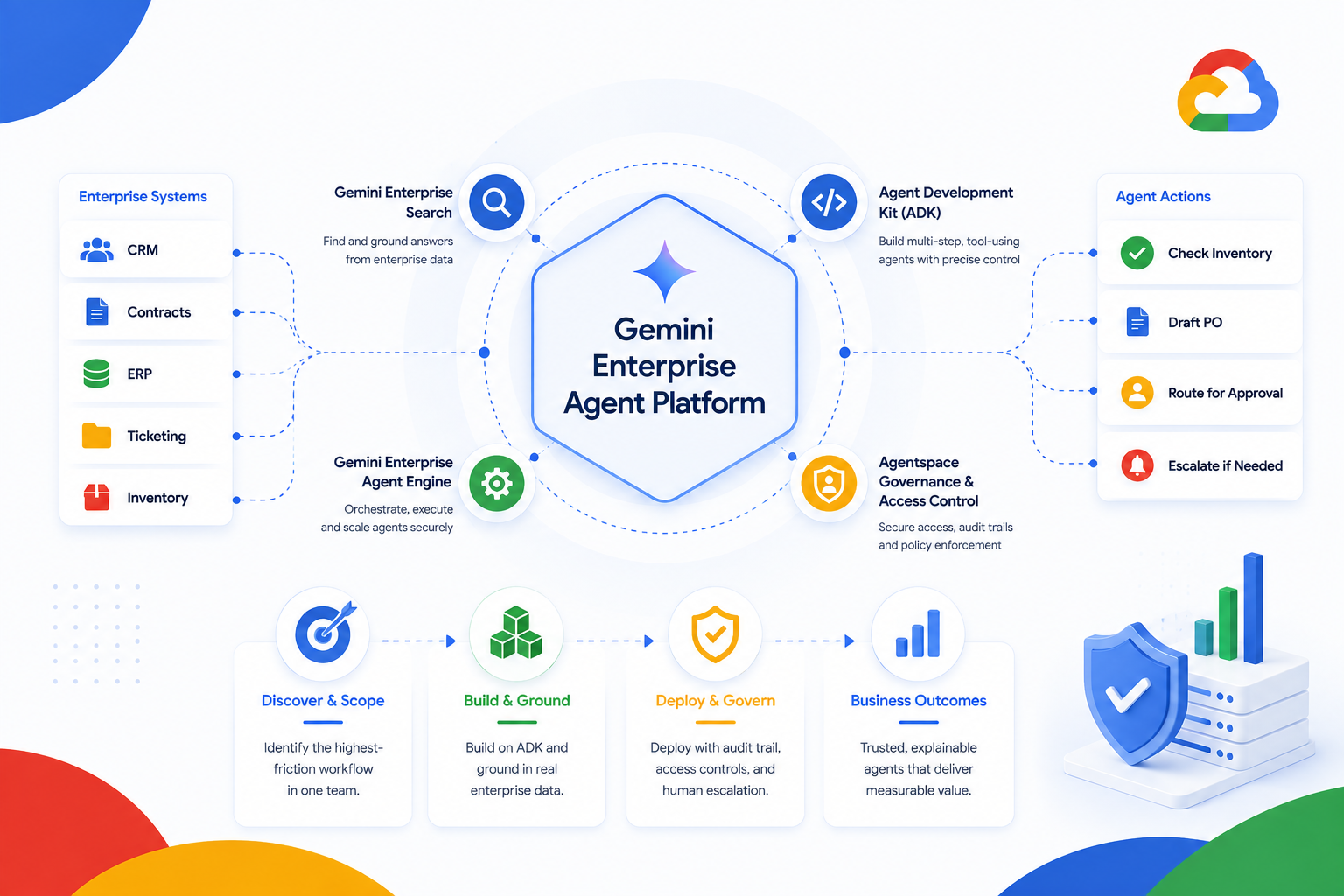
Most enterprise agent development efforts on the Gemini Enterprise Agent Platform don't fail at the model. They fail at the handoff the moment a working prototype has to plug into a real CRM, a real ticketing queue, or a real approval chain on Google Cloud. That's where scope creep, brittle integrations, and governance gaps quietly turn a promising pilot into a shelved project.
In April 2026, Google renamed its agent-building toolset, Agent Builder, Agent Engine, and the open-source Agent Development Kit (ADK) as the Gemini Enterprise Agent Platform. Every component referenced through this series, from Gemini Enterprise Search to Gemini Enterprise Agent Engine, now sits under that single name.
Evonence has been a Google Cloud Premier Partner since 2014, and our certified architects have carried agent projects through exactly this kind of platform transition before. This post lays out where agent development actually goes wrong and what to ask before your team commits to a build.
3 Signs Your Agent Strategy Needs This
Sign #1: The agent is a chatbot wearing an agent's name
It answers questions convincingly but can't take a multi-step action — check inventory, then draft a PO, then route it for approval — without a human stitching the steps together manually.
Google Cloud fix: Rebuild the workflow in the Agent Development Kit (ADK), which is built for multi-step, tool-using orchestration rather than single-turn Q&A.
Sign #2: The agent can't see the data it needs to act on
Answers are generic because the agent is grounded in public web knowledge, not your CRM records, contract repository, or inventory system.
Google Cloud fix: Ground the agent in enterprise data using Gemini Enterprise Search and Retrieval-Augmented Generation (RAG), connected through the Model Context Protocol (MCP).
Sign #3: Nobody can explain what the agent did last Tuesday
There's no audit trail of the agent's decisions, tool calls, or escalations — a hard blocker the moment security or compliance asks for one.
Google Cloud fix: Deploy through Gemini Enterprise Agent Engine with logging and access controls managed through Agentspace, not a one-off script.
What Fixing This Actually Looks Like
Discover and scope one workflow, not "AI for the department". We start by identifying the single highest-friction workflow in one team — not a broad mandate — and prototype the agent's decision logic in Gemini Enterprise Studio before writing production code.
Example: for a support team, this might be "summarize and route a ticket," not "handle all support."
Build on the ADK and ground it in real data. The agent is built on the Agent Development Kit and grounded in your actual systems via Gemini Enterprise Search and MCP connectors, so its answers reflect live data, not a snapshot.
Example: a procurement agent that reads current vendor contracts, not a PDF exported last quarter.
Deploy with an audit trail from day one. We deploy through Gemini Enterprise Agent Engine with defined escalation paths back to a human, and register the agent with Agentspace so security can actually review what it did.
Example: an agent that drafts a contract redline automatically escalates anything above a defined risk threshold
Frequently Asked Questions
How long does it take to move an agent from pilot to production on the Gemini Enterprise Agent Platform?
Can we build agents without disrupting our existing CRM or ERP systems?
What's the difference between Gemini Enterprise Agent Builder and the Agent Development Kit (ADK)?
Does a Gemini Enterprise Agent Platform deployment need to meet ISO 27001 requirements?
Ready to Move Your First AI Agent to Production?
Schedule a free 30-minute Agent Readiness Assessment with one of Evonence's Google Cloud-certified architects. We'll identify your highest-ROI workflow and the fastest safe path to deploying it at no cost.