Invoice-to-PO Matching With an Agent, Not a Rules Engine
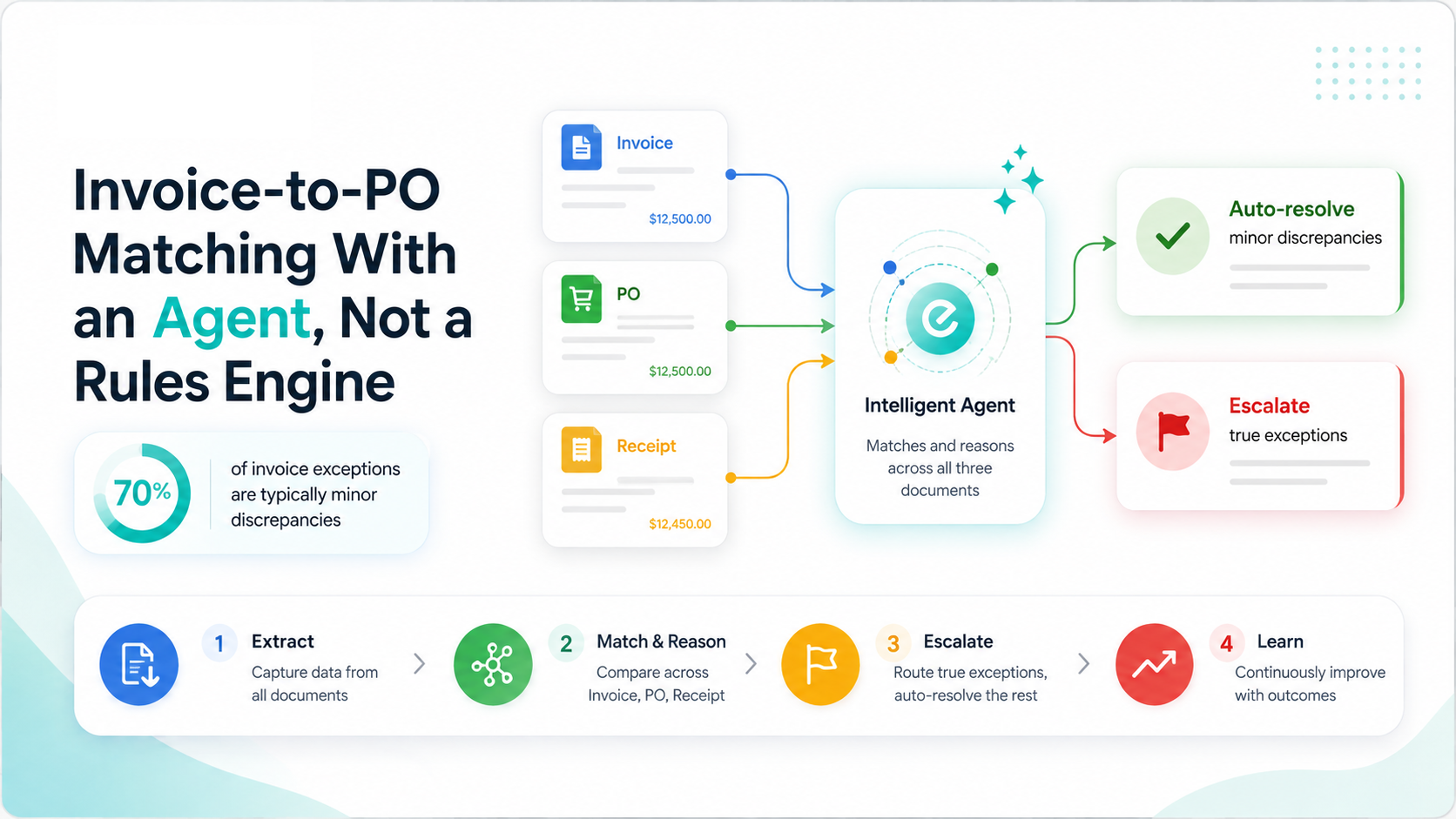
Three-way matching — invoice, PO, and receipt is exactly the kind of task procurement teams have tried to automate for a decade with rules engines, and exactly the kind of task that breaks the moment a vendor changes their invoice template.
A Gemini Enterprise Agent Platform agent handles the same task differently: it reads the invoice with Document AI regardless of format, checks it against the PO and receipt, and reasons about discrepancies — a quantity that's slightly off, a price that changed rather than failing a rigid rule.
Evonence has built invoice-matching agents for manufacturing and logistics clients where vendor invoice formats vary constantly and a brittle rules engine was generating more exceptions than it resolved.
The Build, Broken Into 4 Moves
Step 1: Extract Regardless of Format
Document AI extracts line items, totals, and vendor details from invoices regardless of layout, so format changes don't break the pipeline the way rules-based OCR does.
Step 2: Match and Reason
The agent, built on the Agent Development Kit, checks the invoice against the PO and receipt in your ERP, and reasons about small discrepancies instead of flagging every mismatch as an exception.
Example: a 2% quantity variance within a known tolerance gets auto-approved with a logged explanation, not a manual review.
Step 3: Escalate What Actually Needs a Human
Only genuine discrepancies — price changes above threshold, missing receipts, duplicate invoices — route to a human procurement analyst.
Step 4: Learn From Analyst Decisions
Each time an analyst resolves an escalated case, that decision feeds back into the agent's grounding data via Gemini Enterprise Search, so the exception rate declines over time.
The Track Record Behind This
This is the kind of build Evonence's team has carried from pilot to production before, across regulated and high-growth industries alike happy to connect you with a reference client.
Questions We Hear Every Time
How long does it take to deploy an invoice-matching agent?
Can this run alongside our existing ERP without replacing it?
What's the difference between Document AI and a traditional OCR rules engine?
How is this deployment kept audit-ready for procurement compliance?
Ready to Cut Down Invoice Exceptions?
Schedule a free 30-minute Procurement Automation Assessment with one of Evonence's Google Cloud-certified architects. We'll identify your highest-exception vendor categories first at no cost.